


Export a local configuration backup before a large layout change or before importing another configuration.
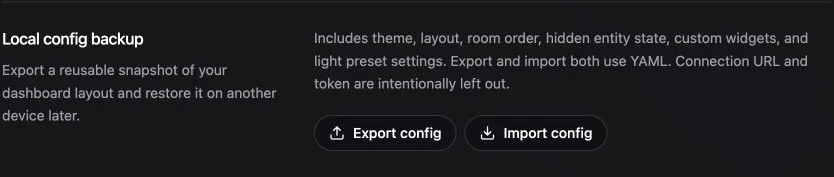
Export a backup
- Open Settings → Dashboard.
- Find Local config backup.
- Choose Export config.
- Store the downloaded file somewhere you control.
The export contains dashboard configuration. It is not a backup of your smart-home provider.
Import a backup
- Return to Local config backup.
- Choose Import config.
- Select a Navet
.yamlor.ymlconfiguration export. - A valid file is applied immediately after selection. Wait for the success message and dashboard refresh.
Import can replace current local configuration. Export the current state first if you may want it back.
The startup wizard also offers Import a config file. It restores configuration directly instead of continuing through the language and appearance steps. Standalone Navet refreshes afterward; the Home Assistant custom panel reveals the imported dashboard in place.